
An approval goes out, two of five people respond. The rest stay silent. The item sits there, and not because someone objects, but because nobody decides and nothing happens when nobody decides.
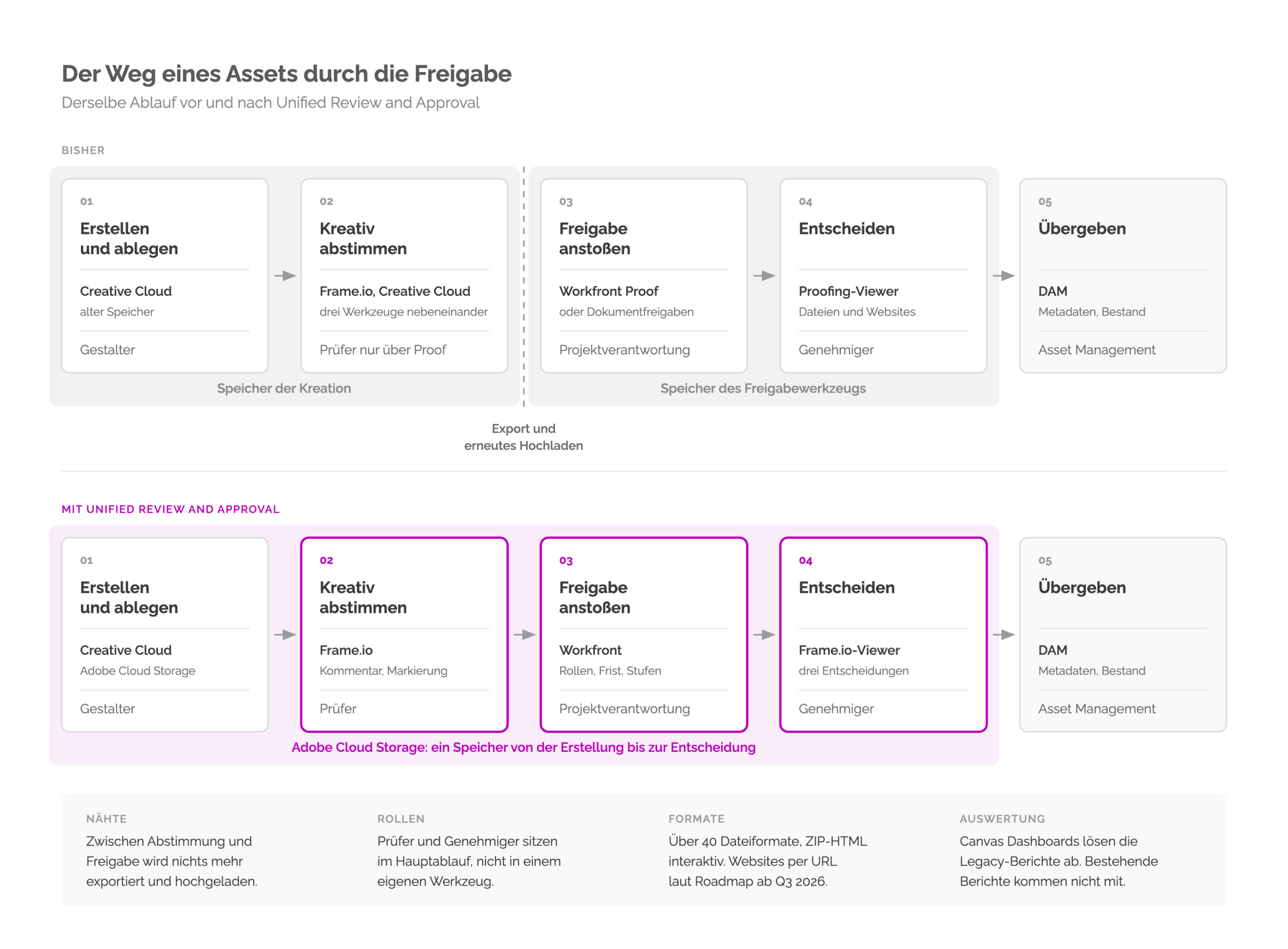
Behind that sits a break in the middle of the creative work. Creative alignment runs iteratively in the creative tool, formal approval somewhere else, with its own roles and its own audit trail. In between, files are exported and uploaded again.
Unified Review and Approval in Adobe Workfront brings Adobe Workfront and Adobe Frame.io for Business together into one surface for review and approval. Both work on the same storage, so an asset no longer has to be exported and uploaded elsewhere.
The surface is not the point. Unified Review and Approval separates reviewers from approvers and makes the difference between an opinion and a decision binding. Who approves, what gets reviewed and by when is still decided by the company.
Adobe Cloud Storage is the prerequisite. The storage is switched on centrally, and which one a project uses is settled when the project is created.
Which content supply chain problem Unified Review and Approval solves
In the marketing organisations we work with, the same pattern keeps coming up: approvals without a deadline.
The longest stretch in the life of a piece of content is rarely production. It is waiting. An approval chain without an agreed deadline is a queue with names on it.
More capacity does not dissolve that pattern, and neither does another tool. It dissolves through three decisions per station: who approves, what gets reviewed, and within what deadline.
That is exactly where Unified Review and Approval starts. It is worth a closer look for that reason, and it is why we look less at the surface than at the roles and deadlines behind it. Four patterns of this kind come up regularly in every content supply chain.
What is Unified Review and Approval?
Unified Review and Approval is the connection between Adobe Workfront and Adobe Frame.io for Business into one coherent experience. The trigger stays in Adobe Workfront, reviewing and deciding happen in Adobe Frame.io, and both draw on the same storage, which also covers Adobe Creative Cloud. Comments and markup stay in Adobe Frame.io and do not appear in Adobe Workfront.
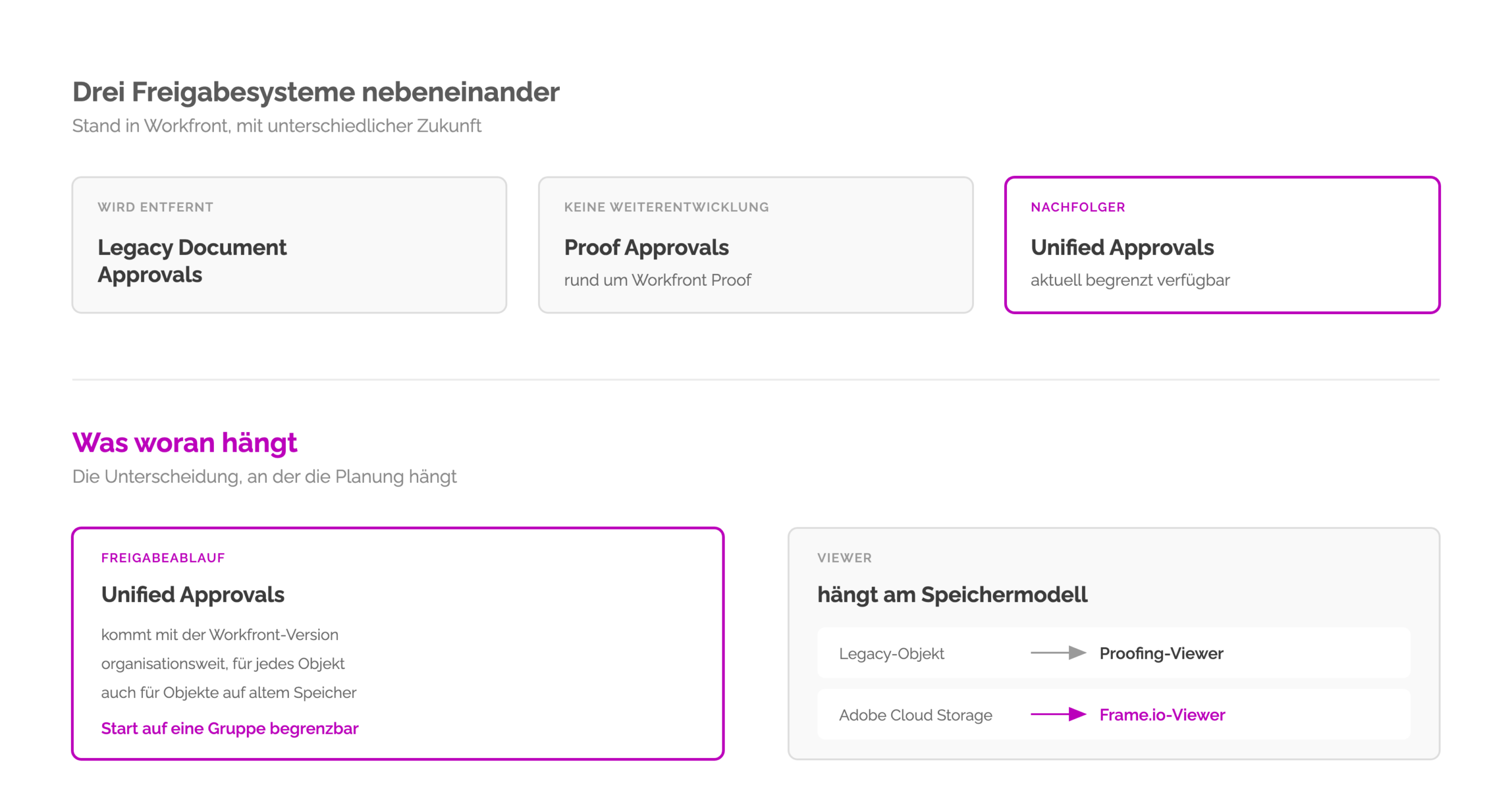
One distinction governs the whole plan: unified approvals is the approval workflow. What you review in is decided by the storage the documents sit on. Adobe names two prerequisites: the instance must be on the Adobe Unified Experience and on Adobe Cloud Storage. The storage itself is switched on under Setup, System, Preferences, either for the whole organisation or for individual groups. Which storage an individual project uses is settled only when the project is created, through the default, the portfolio or the template. Adobe Cloud Storage is therefore the substructure of this approval workflow, not a side condition.
On objects using Adobe Cloud Storage the Frame.io viewer appears, on legacy objects the proofing viewer remains. On the old storage, Adobe Workfront Proof therefore stays available. Adobe guarantees existing customers access for projects created before the integration was enabled. So far there is no end date.
Within GenStudio, Adobe counts it among the building blocks. There, Adobe Workfront, Adobe Frame.io, Adobe Creative Cloud, Adobe Express, AEM Assets and GenStudio for Performance Marketing work together.
Handovers between the approval tools
Anyone who has ever approved a video knows the starting position. A file goes into a review tool, feedback comes back by email, in chat and as a screenshot in a deck. For formal approval the revised version is exported and uploaded somewhere else. Days later someone asks which version was actually approved, and nobody knows for sure.
Part of these handovers sat inside Adobe itself. Three approval tools ran side by side: one in Adobe Creative Cloud, one in Adobe Frame.io and Adobe Workfront Proof. Wherever a proof was started, that is where the comments lived. Finding the history of a review meant knowing which tool it had started in. Unified Review and Approval dissolves exactly that parallel setup.
These handovers are the reason additional software rarely solves an approval problem.
Adobe makes one striking claim in its own post: creatives spend roughly 70 per cent of their time on file management, chasing feedback and following up. We do not adopt that figure as evidence, because Adobe gives no source for it. The direction matches our experience, the number itself we do not quote.
What changes for roles with Unified Review and Approval in Adobe Workfront
This is the part that makes the difference in daily operations, and how big that difference is depends on what an organisation worked with before.
Reviewers comment and mark up. They can flag their review as complete but do not have to. The workflow does not depend on them. Approvers comment as well but make a binding decision. Two are possible: Approve or Needs work. Only that decision moves the item forward. After Needs work the designer uploads the revised file to Adobe Frame.io as a new version, and the approval runs again.
For teams that only used document approvals until now, this is a break. There, only approvers existed. People who were meant to contribute nothing but an opinion were entered as approvers. Nothing else was available. In the end the item waited on five people when only two were supposed to decide.
Anyone who ran Adobe Workfront Proof knows the distinction already. Proof roles could do this. What is new is its position. The separation now sits in the main workflow instead of a separate tool, and reporting comes from the same place.
The deadline is only half the decision
Before any configuration comes a question no tool answers: what happens when nobody responds. Does silence count as consent or as escalation. As long as that is open, every deadline only extends the time until someone asks.
Once it is settled, the rest is built quickly. A single-use approval is created directly on the project or task, a reusable template in the setup area, and both carry multi-stage and parallel paths.
A deadline only takes effect through the reminders, 72 hours before, 24 hours before and on the due date. Without them nobody notices the due date until it has passed.
Configuration is rarely the problem. What usually stays open is what applies on the day after the due date.
What the Frame.io viewer can do in Unified Review and Approval
Reviewing happens in Adobe Frame.io, which supports more than 40 file formats, including native video playback for ProRes, H.265 and DNxHD. Add to that frame-accurate comments, markup tools directly on the asset and files up to 500 GB.
For teams whose production is half moving image, that is the real difference. Enterprise approval tools were built for documents first and for video afterwards, if at all. A video version therefore often goes into approval in a format the review tool understands. What gets reviewed is then something other than what ships later.
Adobe Frame.io also brings its own workspace for creative work in progress, including semantic search, watermarking, rights management with automatic deletion and content credentials for AI-generated material. Most of that requires an enterprise licence and belongs in a separate discussion.
What has to be settled before introducing Unified Review and Approval
A Workfront release that supports Adobe Cloud Storage. The migration to Adobe Cloud Storage runs in three stages, none of which apply retroactively.
Three points belong in the same plan and are regularly overlooked. Approval reporting moves to Canvas Dashboards, existing reports do not come along automatically. And existing Fusion scenarios built on the old document approvals do not run against projects using Adobe Cloud Storage. That leaves a decision per scenario: adapt, rebuild or retire. Adobe has announced new connectors for the third quarter of 2026.
Linked assets from AEM Assets, AEM Assets Essentials, SharePoint or OneDrive can be reviewed and approved today. In the new Documents area that falls away. Adobe puts it briefly: “This functionality is not available in the new Documents area.” That leaves the same decision per provider as with the Fusion scenarios.
In many organisations the evidence for cycle time hangs on the metrics from the first two points. If they are missing after the migration, cycle time can no longer be demonstrated. That costs trust.
Cross-project visibility requires a Frame.io enterprise licence, external participants a Frame.io account.
Legacy approvals, Adobe Workfront Proof and unified approvals compared
With Adobe Workfront Proof behind you, little in unified approvals is new. Coming from plain document approvals, almost everything is.
Scroll the table sideways, the first column stays in place.
| Capability | Legacy Document Approvals | Proof Approvals | Unified Approvals |
|---|---|---|---|
| Name approvers | yes | yes | yes |
| Reviewer as its own role | no | yes, via proof roles | yes |
| Teams as participants | no | no | yes |
| Deadlines | no | yes | yes |
| Templates | no | yes | yes |
| Multi-stage approvals | no | yes | yes |
| Reporting | legacy reports | legacy reports | Canvas Dashboards, Home metrics |
| Automated brand check | no | no | Content Reviewer |
| What you review in | proofing | proofing | Adobe Frame.io, depending on the storage model |
| Formats | file preview | files, video and interactive proofs, including websites by URL | more than 40 file formats, native video playback, interactive proofs from ZIP HTML; websites by URL on the roadmap for the third quarter of 2026 |
| Review linked assets | no | yes, from AEM Assets, AEM Assets Essentials and other providers | no, the new Documents area does not provide for it |
Legacy document approvals explain why unified approvals was needed at all. Adobe Workfront ran two approval worlds side by side: document approvals without roles and without deadlines, and next to them the proof world with both, but in a separate tool with separate reporting. Unified approvals pulls the capabilities of the proof world into the main workflow and turns two paths into one. That is also why Adobe puts the Frame.io viewer in the place of Adobe Workfront Proof. Proof is ahead on two counts today, on formats and on linked assets.
Adobe lists the details per system under Available functionality for document approvals.
What IT and compliance get from Unified Review and Approval
The benefit does not stay in marketing. The same consolidation produces three points that hit IT and compliance harder than they hit the creative side.
Fewer tools mean fewer integrations to maintain and less attack surface to monitor. On top of that, confidential material can sit in fewer places where it should not sit.
The third weighs more because it connects approval with governance. Shared storage simplifies data management, since assets no longer sit scattered across several systems with their own access rights. For companies that have to evidence an approval state years later, that is worth more than any acceleration.
That is also where the catch sits. Permissions do not become simpler, they move somewhere else. An approval matrix built from Workfront roles will describe only one part of the picture. Permissions will be spread across three layers, and Workfront roles are only one of them.
Our reading
Adobe calls review and approval the critical handover point between creation and delivery. We agree, and we would put it more sharply.
You can accelerate production with AI and templates and automate delivery through interfaces. As long as approval stays the bottleneck, the gains on both sides are capped.
That handover point is a technical one too. Until approval the asset sits in Adobe Cloud Storage, afterwards in the DAM, where it receives its metadata and becomes available for delivery. Without that next step the asset stays in a folder and ships nowhere.
The difficult part of an approval is not the approval button. What is difficult is deciding who decides, on what, within what deadline, and what applies when nobody responds. Unified Review and Approval can enforce that model once it exists. It cannot define the model, and that stays with the operating model.
Frequently asked questions about Unified Review and Approval
What is Unified Review and Approval in Adobe Workfront?
Unified Review and Approval brings Adobe Workfront and Adobe Frame.io for Business together into one surface for review and approval. Planning and the trigger stay in Adobe Workfront, commenting and deciding happen in the Frame.io viewer. That ends the loop of exporting, uploading, feedback and uploading again between separate tools.
How do reviewers and approvers differ in Adobe Workfront?
Reviewers comment on and mark up the asset. They can flag their review as complete but do not have to: the workflow continues without their confirmation. Approvers comment as well but must also make a decision. Without that decision the approval does not move.
Which decisions can an approver make in Unified Review and Approval?
Two: Approve or Needs work. There is no intermediate step for small changes. The decision itself does not create a new version. That happens only when the designer uploads the revised file to Adobe Frame.io, and the approval then runs again.
Do I need Adobe Frame.io to use Unified Review and Approval?
Not for reviewing itself: the Frame.io viewer is included for all Workfront users at no extra cost, including external participants assigned to a review. A Frame.io enterprise licence is only needed for the cross-project view. There all linked Workfront projects appear in a workspace of their own.
Can external participants take part in an approval in Adobe Workfront?
Yes. External participants can be assigned to a review or approval and then work in the Frame.io viewer at no additional cost. They do need a Frame.io account for it. That belongs on the checklist beforehand, because an agency with fifteen participants discovers this requirement on the day of the first approval.
Which file formats does the Frame.io viewer support in Adobe Workfront?
More than 40 formats, including all common video, image, audio, PDF and Office types. Professional video formats such as ProRes, H.265 and DNxHD play natively, and comments can be placed frame by frame. Individual files may be up to 500 GB, which makes moving image reviewable without intermediate conversion.
Can linked assets from AEM Assets be reviewed in Unified Review and Approval?
No. Linked assets from AEM Assets, AEM Assets Essentials, SharePoint or OneDrive can be reviewed and approved with Adobe Workfront Proof, but not in the new Documents area on Adobe Cloud Storage. Anyone using that route today needs an alternative before the migration.
Does Unified Review and Approval support reviewing websites by URL?
Not at the moment. Interactive reviews run through ZIP HTML files. Review of a live URL sits on Adobe’s roadmap for the third quarter. Today that is already possible with Adobe Workfront Proof.
Sources and further reading
Sources
- Say goodbye to review chaos: how Unified Review and Approval transforms your content workflows (Adobe Blog, Jason Barron, 26 March 2026)
- Get started with unified approvals (Experience League)
- Document approvals overview (Experience League)
- Adobe cloud storage overview (Experience League)
- Available functionality for document approvals (Experience League)
- Move to Adobe Workfront on Adobe cloud storage (Experience League)
- Proof a linked asset for Experience Manager Assets or Assets Essentials (Experience League)
- Link documents from external applications (Experience League)
Further reading
- Review and approve with the Adobe Frame.io viewer (Experience League)
- Adobe Workfront Integration Overview (Adobe Frame.io Knowledge Center)
- Understanding Unified Approvals: Direction, Reporting, and What’s Next (Experience League, recording)